
Our modern civilization is built around moving letters around, and interestingly, there’s money in doing that. I don’t really know how any of that works, and we’re not going to talk about it in this essay. Instead, this essay is about my rapid experimentation with all kinds of keyboards and keyboard layouts.
I’m a nerd when it comes to keyboards. Within the past year, I’ve used seven different kinds of keyboards and three different layouts (perhaps more if you count the one-day phase), and still, you—the person on the other side of the screen—might be faster than me. Kinda ironic, ain’t it? Currently, I’m daily-driving a Sofle v2 and occasionally an HHKB when I’m pissed because I still don’t know where the & key is on my Sofle.
I’m going to save a lot of your time by saying this at the start: I believe QWERTY is pretty dogshit when it comes to the typing experience. The single biggest gain you’ll make with keyboard layouts is moving away from QWERTY (there, I said it). Whether you choose Colemak, Workman, Graphite, or even Dvorak, the gains are fairly similar. The big gains are in just switching away from QWERTY, because all of the other ones are so much better than QWERTY that the difference amongst the alternatives is kind of negligible.
Why are we still stuck with QWERTY?
QWERTY exists because of typewriters. The common story is that it was simply designed to stop typebars from jamming, but the real history is messier. What is clear is that it was not designed around modern keyboards or modern ideas about comfort.1
That doesn’t mean it’s all bad—even though it is. QWERTY’s greatest advantage is universality: it is on every laptop, every phone, and even the fridge ships with QWERTY on it. Manufacturers ship it because people use it; people use it because every manufacturer ships it. I don’t know anyone IRL who uses a different layout (not counting Seth). It’s a loop now.
And again, I’m not saying QWERTY can’t make you fast. Eventually, with enough repetition, we can get pretty good at literally anything. Ninety percent of the world’s fastest typists use QWERTY because they have been using QWERTY all the time. But speed alone doesn’t define how comfortable or efficient a layout is. Well, if speed is your only motive, stick with QWERTY and grind those TypeGG quotes.
What do I switch to now?
With speed out of the way, the only two things I needed from a real keyboard layout were that it should be universal—i.e., available by default on every OS—and that it should be efficient. Well, everything is efficient when it comes to moving away from QWERTY. This process is fairly similar to finding your favourite Linux distro: there are gazillions of layouts out there. What do you choose?
Well, I went with Dvorak (aged like milk). It was fairly popular at the time, and it was the second-most popular layout after QWERTY. Thus, Dvorak it was. I later found that Dvorak has its own quirks, which I’ll talk about later.
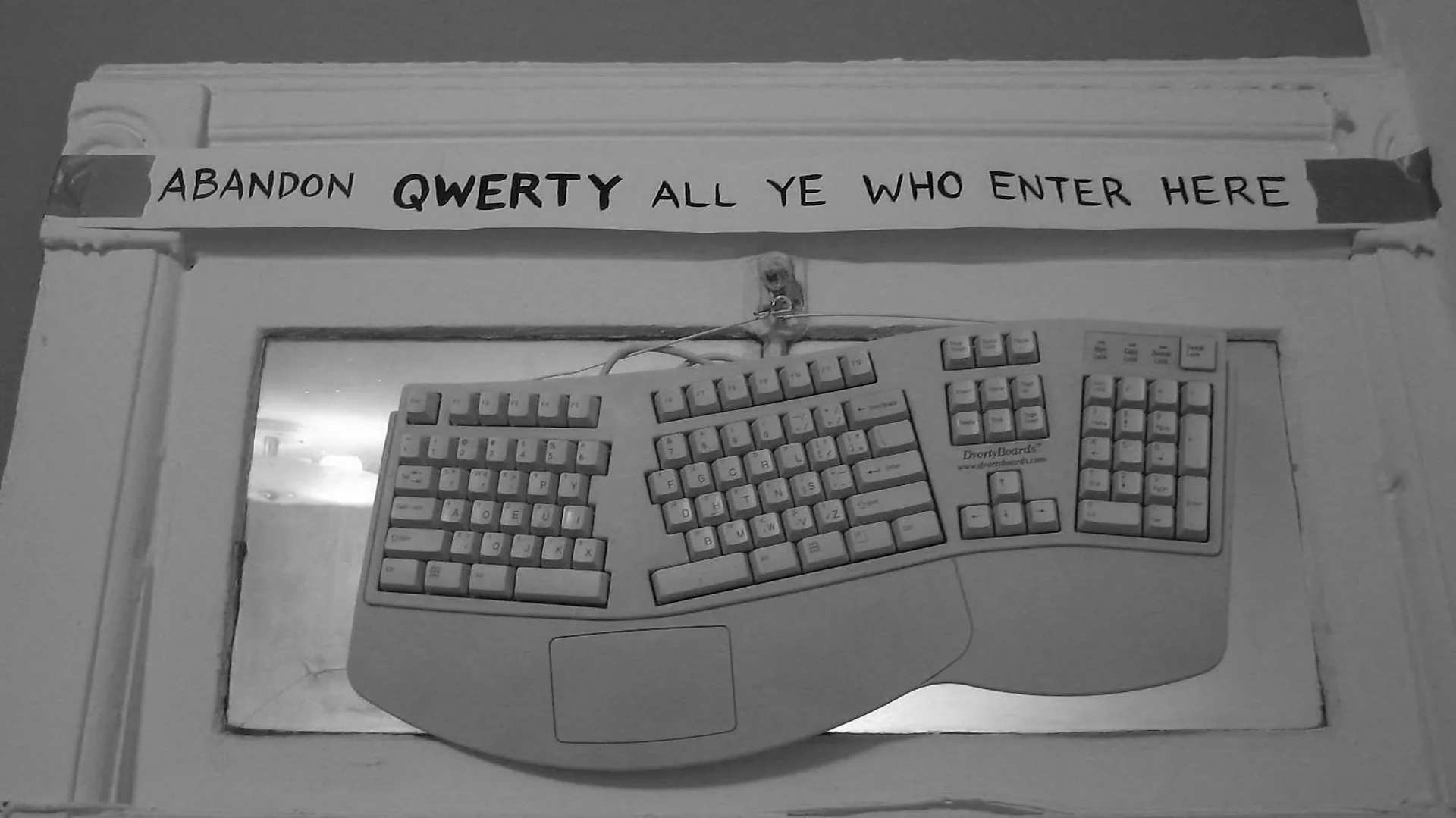
The first week is hell. You fight with QWERTY instead of learning Dvorak, unlearning those deeply ingrained patterns before you can even begin to build new ones. If you don’t know, we don’t really memorise where the keys are; it’s the muscles. They’ve learned where the keys are. You simply think of a word, and they automatically press the specific combo—zero read/write operations done with your brain. To forget something you’ve been using all your life is actually very difficult. You gotta hold your horses and simply learn. Before every keypress, recall where the key is. Sometimes even typing a word used to take twenty seconds (yeah, that’s how bad it gets on day one).
But again, we humans are neuroplastic. We can learn anything and alter our brains. With multiple hours of grinding, I started getting better, but I was also forgetting QWERTY. At one point, I was at 60 WPM with both Dvorak and QWERTY, so it was pretty cool. I also felt something very weird at times: when I typed normally, I used Dvorak, but when I had to spam some shit out really quickly, my brain fell back to QWERTY as a baseline.
Dvorak felt so comfortable on the split keyboard I was using. It was an amount of comfort I’d never felt. Consider it this way: if you have to spend 100 units of energy typing, mainly through hand movements, you could type at the same speed using 40 units of energy. It felt huge. Secondly, it was pretty cool too. OPSEC level: you cannot type on my laptop. The times were good, and I crossed my QWERTY PR within 50 days of switching. Still, something felt missing. I did not feel the nirvana I was promised.
I felt something was missing. Dvorak works through an alternating-hands approach: every word is broken down so that you gotta type with both hands. The good ol’ approach of one hand on the mouse and one on the keyboard did not really work with Dvorak, as typing required both hands on the keyboard. This is pretty good if you are a tiling-window-manager guy, but it sucks if you are on macOS, which is pretty heavily reliant on the trackpad and mouse. This was also when I jumped ship from Linux to Darwin.
Vim also felt really difficult at first, as the HJKL keys are pretty scrambled around on the keyboard. At first, I thought of remapping the keys back to their old places, but again, what’s the point of switching then? So I decided to learn the new keybinds, as Mr. Dvorak intended.
Why did I move again?
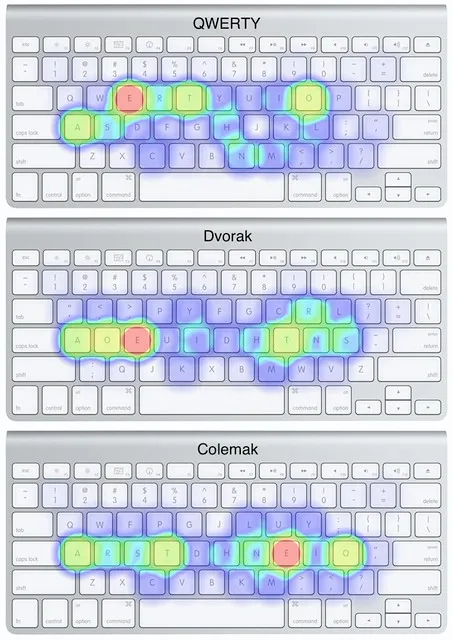
If everything was going well, why did I move from Dvorak again? Well, I’m an internet nomad, pal. I was pretty active in typing communities during that time and getting blackpilled on Dvorak. And as they say, when you find even a needle-worthy con about something and then read the theories that eventually discard it as a bad layout, you end up switching.
Dvorak was designed in the 1930s, and newer layouts made different trade-offs around rolls, same-finger use, and shortcuts.
I thought to myself, perhaps it’s time to switch again.
And we were back to square one. I thought to myself again: if it was also so bad, why did I even bother switching? I blame not doing enough research (and Primeagen used Dvorak too). Welp, I was naive at times. I do things mostly for the fun of it; the outcomes don’t really matter to me.
Now the next big question was: what do I switch to? I didn’t want to go back to QWERTY because it was long forgotten, and why would you wanna choose the inferior version? (That’s like choosing Ronaldo over Messi.) What could I do now so I didn’t end up in this same loop again?
There were multiple options: Semimak, Colemak, Workman, and pretty modern options like Graphite and Gallium. This was a whole rabbit hole I discovered. I also talked with a guy who is layout-fluid and can type at 150 WPM in five different layouts. So that proved it was possible that I could perhaps work with two layouts: a different layout as my main, and QWERTY as a fallback for its universality. Well, I really enjoy using my computer, and this is the only thing I do on a daily basis without thinking much about it, so it was worth it for me to spend 50 more hours learning something. Hehe, shoots myself.
I chose Colemak
I ended up going with Colemak as my primary layout. Well, I wouldn’t really benefit from the primary advantage of switching from QWERTY to Colemak because I was moving from Dvorak. So we were back to square one again; every keystroke felt foreign to me.
And the hell persisted for a long time again. It wasn’t that bad this time, as I had no classes during this period. I got a winter break for my end-sem exams. I really used that break—not for studying, but for something I might not even be using in a year.
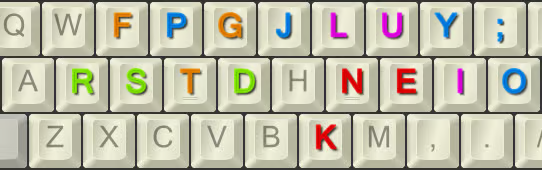
Colemak felt way different from Dvorak. There was something about it that stuck so well. One of the reasons I think I like Colemak is the rolling effect: simply roll out the keys. The stress distribution between the hands was fairly even.
And if you are someone coming straight from QWERTY, good lord, you are in luck. Colemak maintains the shortcut keys present on QWERTY. Z, X, C, and V are in the same places, so you can keep using shortcuts with one hand while using the mouse with the other.
Here is the part of the journey I recorded:
The climb to 90 WPM was fast. Then I was stuck in the 90s for a very long time. Now I’m stuck around the 110 WPM range. I feel like this is pretty normal. I feel some level of nirvana with Colemak. The keyboard changed again; I moved from an HHKB to a Sofle last month, and I felt a dip again. But I think it was just 5 WPM, so it’s basically nothing. Even on a split keyboard, Colemak feels so fast, and with the rolling effect, it seems very comfortable too.
Things you must consider before switching, which I actually didn’t
If your goal is only to get faster, I won’t really stop you, but I don’t think switching layouts is the right answer. Instead, simply practise more. Well, on the contrary, switching layouts will make you faster—not because it triggers something in your brain, but because of the amount of time you spend learning to type. The more you type, the more precisely you press your keys. That improves your accuracy, and with accuracy comes speed. It’s basic maths.
Comfort is a better reason to experiment, but a new layout is not something that will unlock your locked parts of the brain. If your wrists kinda get sore, that might be a good reason too. Another reason could be that you’re curious. Well, that reason is perfectly fine. The more you fuck around, the more you find out. My point here is that switching won’t magically increase your speed. Switch if you’re motivated by curiosity; don’t switch merely for the speed gain.
Also consider the time it will take you to catch up with your old speed. Welp, I know some people who got back to their old speed within a week, but they spent an insane amount of hours grinding. Over the past year, I’ve spent around 140 hours practising: about 100 hours on Monkeytype, 10 hours on keybr, and another 30 hours on typegg.
Also, just mentioning: you don’t really need a new keyboard or even a new set of keycaps to learn. Zero pennies wasted. We will pay with our time here (crying). While learning, try not to look down. Printed keycaps become a crutch when they no longer match what you are typing. You do not need blank keycaps; simply learn it key by key.
Should you switch?
Now I’ve scared you away from switching, here is why I still think more people should try it: it is fun. I don’t know, man, I enjoy typing. Minecraft and typing are the only games I play.
This is the progression I would use again:
- Learn the layout. Use keybr until every letter is unlocked and you can find it without looking down. Ignore WPM.
- Quote mode grinding. Move to Monkeytype quote mode and typegg. Words and punctuation expose awkward combinations that drills hide.
- Practice very little but very often. A focused session you can repeat tomorrow beats one heroic grind followed by sore hands and hatred.
- Track plateaus and trends, not personal bests. Your best run is noisy. Compare a weekly average, and expect long plateaus.
Would I repeat this experiment?
I’m pretty content with how Colemak has been performing for me, and like I said, the performance changes you get from moving around different layouts are pretty negligible. It comes down to taste—what you enjoy and what sticks with you. Lately, Semimak has been tempting me a lot, and I’m trying my best to avoid it for Lord knows how long.
So far, if I’ve somehow managed to convince you to give a different layout a try, I highly recommend checking out Semimak.
S. J. Liebowitz and Stephen E. Margolis, The Fable of the Keys (SSRN record), The Journal of Law & Economics 33, no. 1 (1990), pp. 1–25. Their argument is the useful hostile version of this story: the evidence that Dvorak is superior to QWERTY is much thinner than its evangelists suggest.↩︎