Well, consider this part two of an odyssey in keys. I was pretty content with how my keymap was. Colemak felt comfy, I liked the rolling effect, and I didn’t really want to go through learning another layout again. It was just the layers that were pissing me off a little. In the last post, I mentioned going back to the HHKB because I still couldn’t remember where & was on the Sofle. So, about two weeks ago, I finally decided to do something about that. Same keeb, same Colemak, just making the symbols more accessible and putting the navigation keys somewhere I could get used to. There are three layers now: base, symbols, and navigation. The left thumb holds symbols, the right holds navigation, and releasing either takes me back to typing normally. Brackets, braces and parentheses are grouped on the right of the symbols layer; navigation has arrows on the left and a number pad on the right. S and E also become Command when held, though I kept the thumb Command keys for when my other hand is on the mouse. I flashed both halves with Vial/QMK and used Vial for the smaller changes after that, saving the previous layouts as I went.
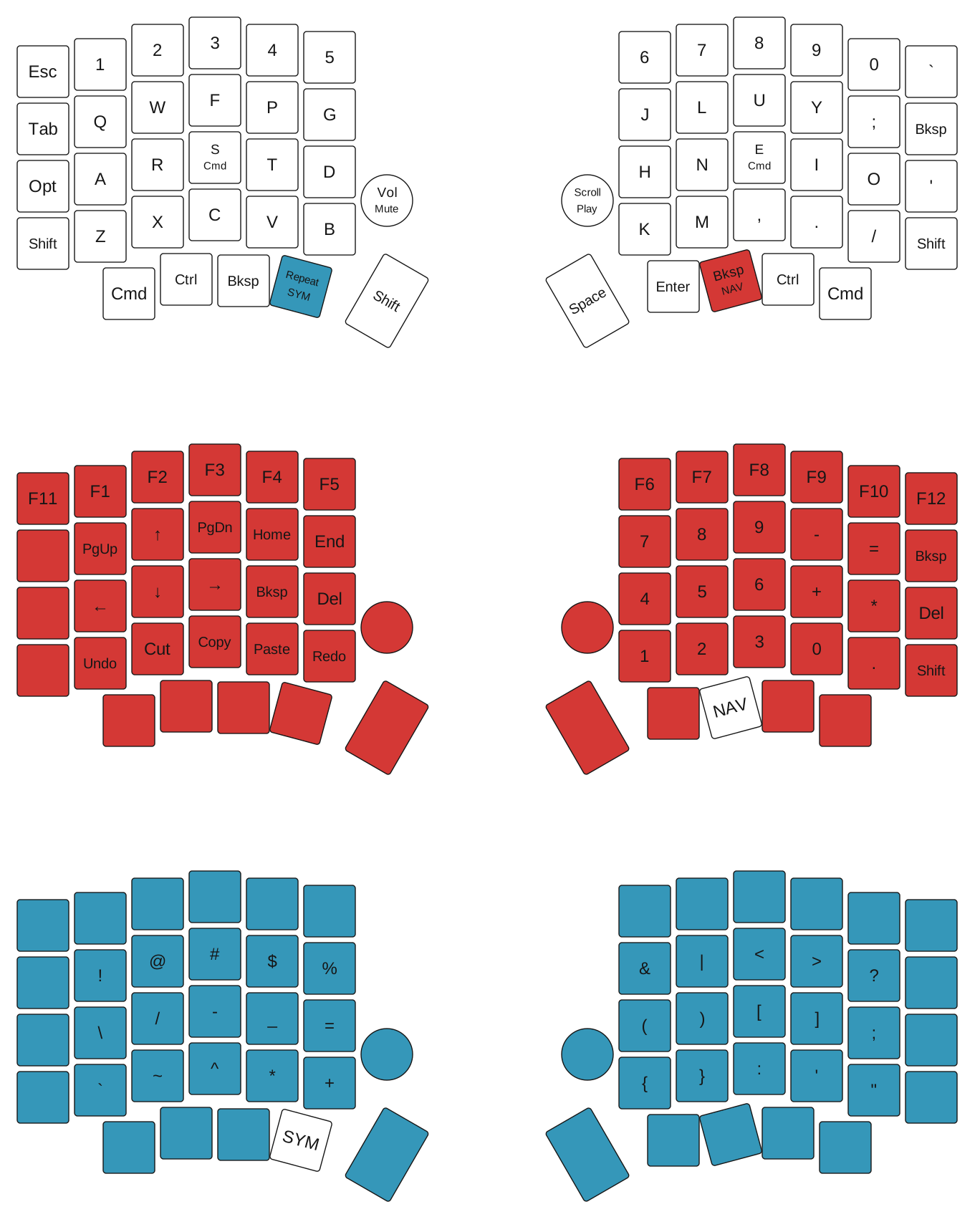
I also blame titor for this lmao. He was the one who suggested adding a repeat() key, which repeats the last key I pressed. It sounded pointless at first. Let’s say I’m typing book: I press B, then O, and my pinky is already on O. Why not press it again? With Repeat, I’m typing b, o, Repeat, k, so now I’m using four different keys for this word. That’s what I told titor too. To be honest, this felt like extra effort with little to no return. I couldn’t see myself learning another key just to find a substitute for the one already under my finger. Well, I still ended up going with it. It sits under my left thumb: tapping it repeats, and holding it opens the symbols layer. I didn’t really need an extra key, but I still had to remember to use it.
Well, the thing I was overlooking was the movement. To press O twice, my pinky has to press, release, and press again. With Repeat, I can get the left thumb ready for the second O while the pinky is coming back up, then roll between the two fingers and continue with K. Still four presses, but using two fingers feels much more efficient to me than making the pinky do both. I already liked the rolls in Colemak; this lets me keep that feeling through double letters too. That was what sold me on it. Repeat also remembers modifiers, so I can do Cmd+Z, release it, then tap Repeat for another undo without holding the whole shortcut. The same idea works for a second = or &, or repeating a motion in Neovim. Once the first action is done, the thumb can do it again. Of course, my typing speed still fell after the change. Getting used to Repeat took another day, because I kept wanting to press the original letter twice out of habit. Knowing why it should feel better didn’t mean I would immediately remember to use it. And as usual, I did this during exam week, cuz why not? For some reason my curiosity about doing random things doubles whenever I have exams. I was pretty happy with the keyboard before all this, and the layers had been mildly annoying me for a while. Apparently that was the week they needed fixing.
Acknowledgments
Thanks to ze_or for the feedback, and to titor for suggesting the Repeat key.