meet prometheus, the machine behind my workspace
It’s my Darwin setup, managed with Nix. Not NixOS, just regular Darwin with nix-darwin and home-manager doing most of the work. I still use Homebrew for normal apps because honestly that’s just easier.
I started doing this because I kept forgetting why my machine was set up a certain way. Some setting I changed six months ago, no idea why it’s like that anymore.
So this is basically notes for myself. When I inevitably break something later, I want to be able to come back here and figure out what I was doing.
$ tree ~/dots
.
|-- flake.nix
|-- hosts/prometheus
|-- modules
|-- home
|-- options
prometheus is my Mac’s name. cronus is what i named my server. so eh building my own empire lol.

Why even use Nix?
Cuz I hate myself, well, the main issue with vanilla Mac is you already know it. We don’t got a real package manager, and Homebrew has its own problems too. And there comes a day when Mac just shits the bed, and if you’re like me and don’t keep any Time Machine backup, it’s over for you pal!
Also the setup gets messy real fast. You install some stuff with brew, some
with npm, some language server from who knows where, random junk shows up
in your .config and you got no clue how it got there. But eh, it works, so
why touch it.
Same thing happened when I set up a PaperMC server. It needed Java 25, I had 21(I guess) installed. Gradle kept grabbing the wrong JDK and the build just died with some weird class version error. Took me a while to even get why, my shell and Gradle just didn’t agree on which Java to use.
Fix was easy once I found it, but the whole thing could’ve been avoided if the machine just had one answer to “what Java am I even using.”
That’s basically why I use Nix. Instead of a bunch of stuff I gotta
remember, it’s just sitting in .nix files:
- package lists
- shell aliases
- Helix config
- Java and Gradle versions
- macOS defaults
Before, setting up again meant:
$ install brew
$ install apps manually
$ copy configs
$ fix shell
$ fix editor
$ forget 4 hidden Mac settings
After, it is closer to:
$ clone dots
$ install nix
$ nh darwin switch
I ain’t no pro with Nix yet, I’m just evolving as I go. But it makes sense, if it’s a GUI app, Homebrew cask does it. Everything else just goes in packages.
What is in the Stack?
The setup uses:
- flakes as the entry point
- nix-darwin for macOS system config
- home-manager for my user config
- flake-parts to split the flake into modules
- Homebrew for apps and casks because macOS is macOS
The flake inputs are basically:
nixpkgs.url = "github:NixOS/nixpkgs/nixpkgs-unstable";
nix-darwin.url = "github:nix-darwin/nix-darwin/master";
home-manager.url = "github:nix-community/home-manager/master";
flake-parts.url = "github:hercules-ci/flake-parts";
And this setup only targets my Mac:
systems = [ "aarch64-darwin" ];No fake multi-platform support. I use an Apple silicon Mac, so that is what this config is for. One machine, one target.
Repo Layout
The repo is split like this:
$ ls ~/dots
flake.nix          main flake file
options/           custom flake options
modules/           shared Darwin modules
hosts/prometheus/  actual machine config
home/              my home-manager config
home/modules/      fish, helix, zellij, ghostty, etc
One nice thing is that all .mod.nix files get imported automatically:
imports = filter (hasSuffix ".mod.nix") (listFilesRecursive ./.);So if I add a new module, I don’t have to go edit some giant import list. I just
make a new .mod.nix file and it gets picked up.
Prevents the repo from becoming one huge
file named something like final-final-actual-config.nix.
The Host Config
The actual Mac lives here:
$ realpath ~/dots/hosts/prometheus/prometheus.mod.nix
/Users/melqtx/dots/hosts/prometheus/prometheus.mod.nix
This creates the Darwin config:
flake.darwinConfigurations.prometheus = inputs.nix-darwin.lib.darwinSystem {
  system = "aarch64-darwin";
};
That file pulls in all the pieces:
- Darwin defaults
- Homebrew
- system packages
- home-manager
- my user config
So when I rebuild, it is not just packages. It also applies my shell, editor, terminal config, and macOS settings.
This is the part I actually care about. I don’t want “new laptop setup day” to mean six hours of clicking through settings while pretending I remember what I installed last time.
Packages
Most CLI stuff comes from Nix.
Base tools:
fishstarshipzellijhelixneovim
Better terminal tools:
zoxideinstead of normalcdatuinfor shell historydirenvandnix-direnvfor project envsfzffor fuzzy searchripgrep,fd,bat,eza,yazijq,yq,jless,millerbtop,bottom,procs,dustjust,watchexec,hyperfine,difftastic
Mac Apps and Defaults
I still use Homebrew because some Mac apps are simply easier that way. Ghostty, Firefox, Signal, Discord, Spotify, Cursor, Zed, VS Code, OrbStack, and Prism Launcher all come from brew casks.
The split is:
- Nix for the dev setup
- brew for Mac apps
nix-darwin also handles the small macOS defaults that make a fresh machine feel wrong until they are fixed: auto-hide the Dock, hide recent apps, show file extensions, show hidden files, speed up key repeat, and disable press-and-hold accents.
And, very importantly, it can make window resizing stop feeling like the laptop is underwater:
system.defaults = {
  NSGlobalDomain = {
    NSWindowResizeTime = 0.001;
  };
};
Hyper Key
I remapped right Cmd on my HHKB to F18:
system.keyboard = {
  enableKeyMapping = true;
  userKeyMapping = [
    {
      HIDKeyboardModifierMappingSrc = 30064771303; # right cmd
      HIDKeyboardModifierMappingDst = 30064771181; # F18
    }
  ];
};
Then Hammerspoon uses F18 with hjkl to move between windows. Pretty neat lol.
Terminal Setup
The terminal stack is:
$ echo "Ghostty -> Zellij -> Fish -> Starship"
Ghostty -> Zellij -> Fish -> Starship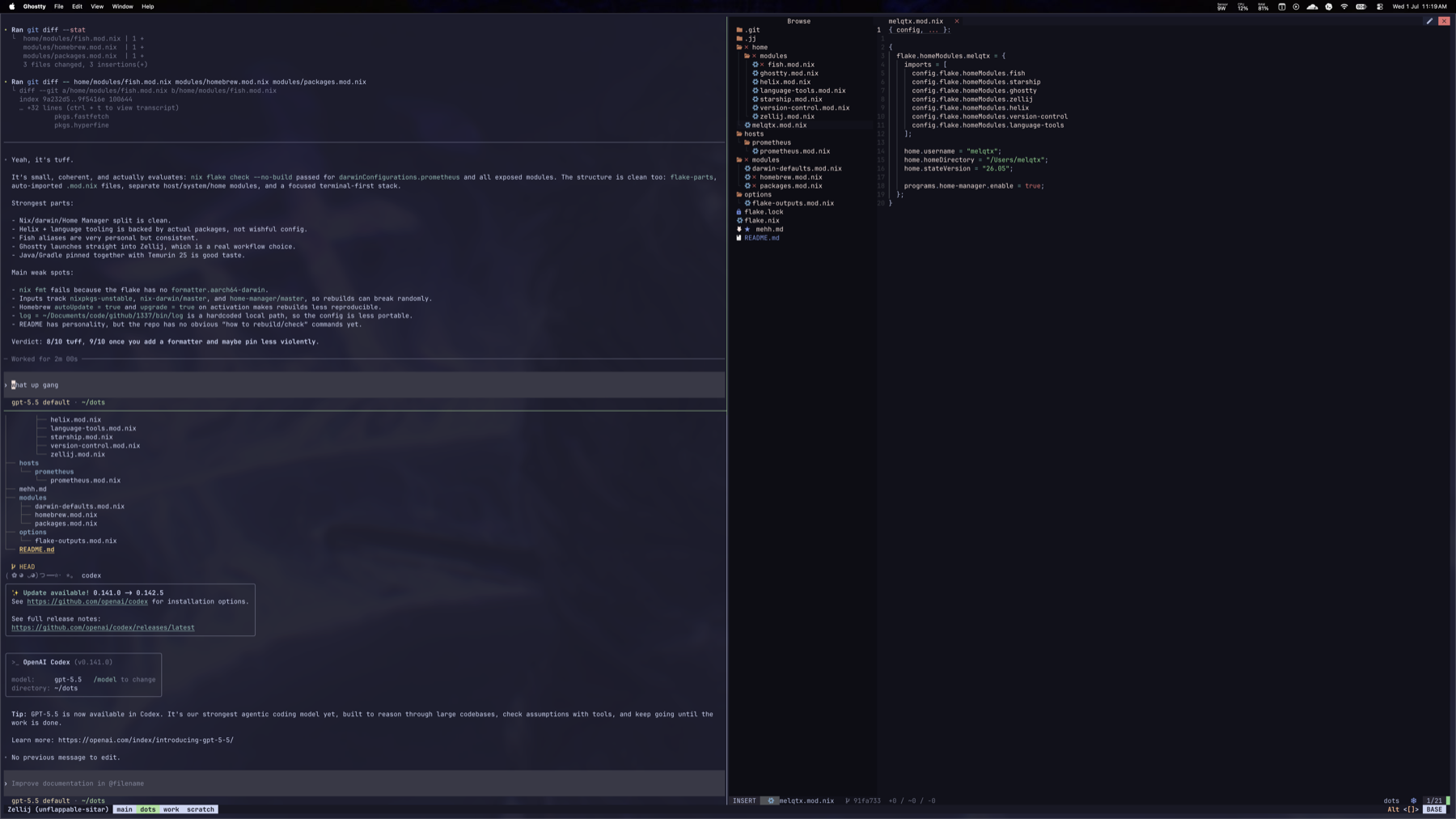
Ghostty opens Zellij directly:
command = direct:zellij --layout cleanSo when I open the terminal, I don’t just get an empty shell. I get my workspace.
The default zellij layout has:
maindotsworkscratch
dots opens in ~/dots.
work opens in ~/code.
A workspace is not just installed programs. It is also the little commands that make starting work feel easy.
Fish
Fish is my shell.
I use aliases to replace the default commands with nicer tools:
cd = "z"
cat = "bat"
grep = "ripgrep"
find = "fd"
du = "dust"
ps = "procs"
top = "btop"
http = "xh"
diff = "delta"
I am also messing around with short aliases for jujutsu:
js = "jj status"
jc = "jj commit"
jd = "jj diff"
jl = "jj log"
jn = "jj new"
ju = "jj undo"
And the main command:
nh darwin switchSo the loop is basically:
$ hx ~/dots
$ nh darwin switch
$ echo "use new setup"
I still have not figured out why direnv sometimes does not pick up .envrc
on the first cd. I just cd .. and cd back.
When it works, the machine feels boring in the best way.
Editor
Lately I’ve been trying a bunch of editors, Zed, Helix, all that. But we all know Neovim is the goat honestly. Still, been using Helix for a few days now and it just makes sense too. It’s easy to config and the package names don’t change every six months like Neovim does lmaoo, for nvim i kinda like kodo, been using that for a while now, you gotta update lotsa packages i there, neovim being neovim lol.
Not saying it’s my forever editor or nothing dramatic like that. Just seeing how much of my day can live in it before I run back to Neovim.
Config still has the normal editor stuff wired up:
- autocomplete
- soft wrap
- auto save
- diagnostics
- inlay hints
- language servers
- formatters
The nice part is the language tools are also installed through Nix. So if Helix says “use ruff for python”, ruff is actually there. Same for nixd, gopls, rust-analyzer, prettier, jdtls, and the rest.
This is less about Helix being my whole personality and more just keeping the tooling honest(I might have ADHD ngl). Opening an editor and half the language tools are just missing, that’s a very specific kind of sad lol.
Version Control
Also trying out jj rn. And ong bruh, it was so tiring at the start, like nothing made sense. Git is still there, GitHub CLI still there, I’m not living in a cave. But jj is slowly making sense to me now, I’m going kinda slow with it but it’s reasonable, like how it’s actually made makes sense. Kinda feels like how Git should’ve been made honestly (no offence to sensei Torvalds).
I still reach for Git on autopilot most of the time cuz muscle memory is
strong and every README, CI error, and Stack Overflow answer speaks Git
first. Then I run jj status and remember why I liked it, the working copy
is just an actual change, not some weird state I’m always protecting from
myself.
Don’t know if I’ll go full jj brained yet. Still at the stage where half the appeal is real and half is just the feeling of finding a secret door in a tool I thought I already understood.
Config has small aliases for stuff I keep typing:
s = ["status"]
d = ["diff"]
l = ["log"]
n = ["new"]
u = ["undo"]
Delta is the pager, diffs look nicer with it.
Rebuilding
The main command is:
nh darwin switchThat applies the whole system config. So if I change packages, shell aliases, Helix config, zellij layout, or macOS defaults, I just rebuild and get the new setup.
If it breaks, I fix the repo. If it works, I keep it.
Beautifully simple. Deeply capable of ruining your evening.
Why I like this Setup
Cuz the machine feels less random now. I can see what’s installed, I can see why some setting exists, I can rebuild the whole thing whenever, and I can just keep moving more stuff into config over time.
And I still get to keep the fun personal stuff too, battle, battlestation,
my prompt, my aliases, my terminal layout, all of it.
It’s just a workspace that feels like mine, doesn’t turn into some mystery state every few weeks that I gotta reverse engineer.
Pretty much just:
$ open -a Ghostty
$ battle
$ echo "do the work"
If future me is reading this because something broke: check the
.mod.nix files first, then blame direnv, then blame yourself.